Project Overview
This is the third case study in a series documenting the full SEO rebuild of Abdul Majid 25 Urban Residence — a 23-room boarding house property in Indonesia. The first case study covered the platform migration from Blogspot to WordPress. The second documented the crawlability and canonical fixes applied to my own portfolio site. This case study goes deeper into the core technical achievement: building a complete WordPress SEO architecture entirely from code.
The challenge was specific: free SEO plugins cover the basics, but advanced Schema markup types, precise canonical control, and custom breadcrumb logic all sit behind paywalls in the major plugin ecosystems. The client's budget did not accommodate premium plugin subscriptions. Rather than accepting a capability ceiling, I wrote everything from scratch.
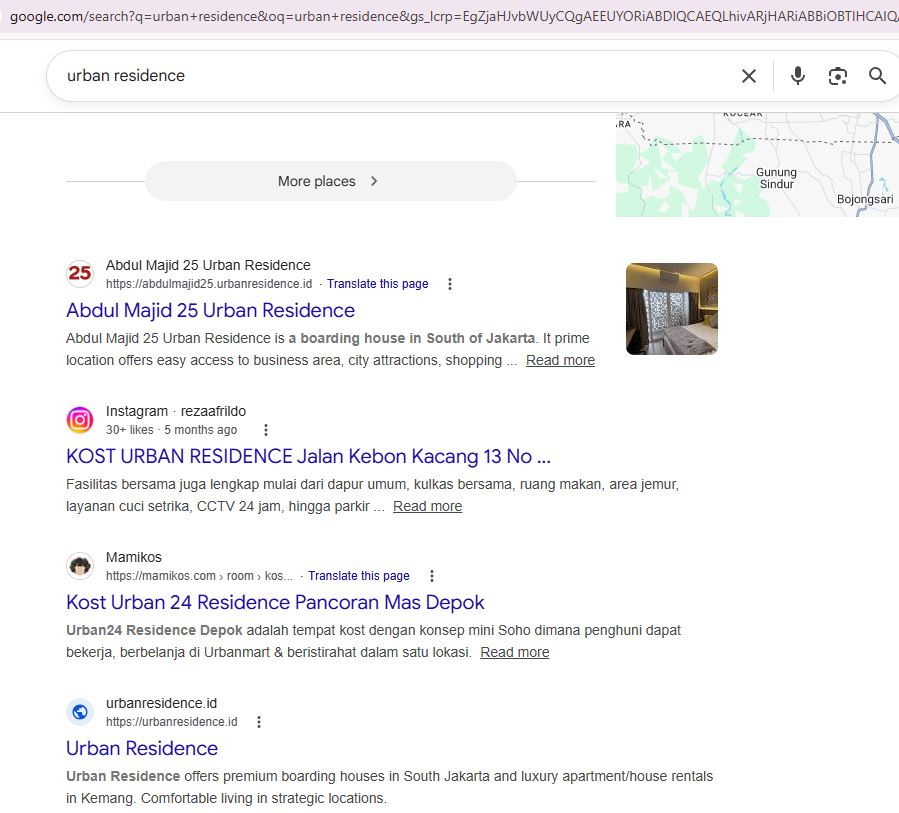
The result was a WordPress site with full, hand-coded SEO architecture — Schema JSON-LD, meta tags, Open Graph, canonical URLs, breadcrumbs, and a custom PHP admin dashboard — all functioning without a single premium plugin dependency. The site was indexed within 6 hours of launch and climbed to Google Page 1 Rank #1.
SEO Problem Identified
After migrating to self-hosted WordPress, two overlapping problems needed to be solved simultaneously.
Free-tier SEO plugins (Yoast SEO, RankMath free) generate basic meta tags and limited
Schema markup. They do not support full LocalBusiness Schema with
nested GeoCoordinates, custom BreadcrumbList logic per
page type, or conditional canonical output based on URL patterns.
Achieving these required either a premium subscription or a custom code solution.
The client needed a room availability page on the live website — displaying real-time
room status from a database. The admin dashboard managing this data ran its own PHP
application with a separate database configuration stored in a subdirectory of the
WordPress installation. Calling this config from within a WordPress page template
creates a direct conflict with WordPress's own $wpdb database connection —
potentially corrupting queries or triggering fatal errors.
Technical SEO Analysis
Before writing a single line of theme code, I mapped out the full SEO architecture
the site needed — every output that would need to appear in the
<head>, every Schema type per page, and how the CMS data
would need to flow into front-end page templates.
Schema requirements by page type
A local property business requires different Schema on different page types. Applying a single Schema type site-wide (as most free plugins do) leaves significant structured data opportunities unused. The analysis identified four distinct Schema types needed across the site:
Meta tag architecture
Standard WordPress outputs a basic <title> tag.
A complete SEO meta tag architecture requires conditional output of
meta title, meta description, Open Graph title, Open Graph description,
Open Graph image, og:type (website vs. article), Twitter Card tags,
and robots directives — each varying by page type. This needed to be
written as a single conditional PHP block in header.php.
CMS integration architecture
The room availability dashboard runs as a standalone PHP application.
The challenge was making its read functions accessible inside WordPress
page templates without introducing a second database connection that
would override or conflict with $wpdb. This required a
purpose-built architecture that I refer to as a config-bridge:
an isolated PHP include file that exposes only the necessary data
functions — using its own PDO connection — without touching WordPress internals.
The site required a layered SEO architecture: meta tags, Schema markup, canonical logic, and breadcrumbs each functioning independently but consistently across all page types. No existing free plugin handles all four layers simultaneously with the precision needed. Writing each layer in code was the only path to complete control.
SEO Strategy Implemented
The strategy was built on a single principle applied consistently across all
technical SEO projects:
own every output. If a tag appears in the
<head> of the site, it should be there intentionally —
placed by code that I wrote and understand completely.
Custom WordPress theme — file structure
The theme was built from an empty directory. No starter theme, no framework, no generated boilerplate. The complete file structure:
- themes/urbanresidence/
- ├── style.css ← theme declaration
- ├── functions.php ← SEO hooks, Schema, canonical, breadcrumb
- ├── header.php ← all meta tags, OG, Twitter Card
- ├── footer.php
- ├── index.php ← homepage template
- ├── page.php ← default page template
- ├── single.php ← blog post template
- ├── 404.php
- └── templates/
- ├── page-rooms.php ← room availability (calls config-bridge)
- └── page-contact.php
- dashboard/ ← standalone PHP app (outside theme)
- ├── config.php ← PDO connection (isolated)
- ├── bridge.php ← safe read functions for WP templates
- └── admin/ ← dashboard UI
Plugin vs. custom code: the real comparison
The decision to write everything in code rather than configure plugins comes down to one question: who controls the output?
| Free SEO Plugin | Custom Code (This Project) |
|---|---|
| Basic meta title and description output | Full conditional meta output per page type, post type, taxonomy |
| Limited Schema types (Article, WebPage only on free tier) | Any Schema type needed — LocalBusiness, GeoCoordinates, BreadcrumbList, Article |
| Plugin generates canonical based on permalink settings | Custom canonical logic — any page type resolved to any URL pattern |
| Breadcrumb tied to URL structure or plugin hierarchy | Breadcrumb built independently from URL — displays any path needed |
| Plugin adds its own markup and scripts to every page | Zero additional markup — only what is intentionally placed |
| Updates may change output behavior unexpectedly | Output changes only when the code changes — full version control |
Implementation Process
Implementation was completed across three days, building each layer in sequence: theme structure first, meta tags second, Schema third, CMS bridge last.
-
1Theme Scaffolding Created all required WordPress theme files with minimal boilerplate. Registered theme support features in
functions.php: title-tag, post-thumbnails, menus, and custom image sizes. Enqueued CSS and JS assets with versioning for cache-busting. -
2Meta Tag Architecture in header.php Wrote a conditional PHP block covering: dynamic meta title (page title + site name), meta description from custom field with fallback to excerpt, Open Graph tags (og:title, og:description, og:image, og:type, og:url), Twitter Card tags, and robots meta with noindex logic for search/archive pages.
-
3Schema JSON-LD Implementation Wrote four Schema blocks as PHP functions in
functions.php, each hooked towp_headwith conditional checks.LocalBusinessoutputs only on homepage and contact page.BreadcrumbListoutputs on all pages with dynamic path generation.Articleoutputs only on single posts with dynamic author and date fields. -
4Canonical & Breadcrumb Functions Removed WordPress default canonical output. Wrote custom canonical function covering all page types. Wrote independent breadcrumb function with conditional path logic — no dependency on URL structure.
-
5Config-Bridge Architecture Built the room availability dashboard as a standalone PHP/MySQL application. Created
bridge.php— a file containing only PDO-based read functions for room data, with no reference to WordPress globals. WordPress'spage-rooms.phptemplate includesbridge.phpand calls its functions without touching$wpdb. -
6WhatsApp Dual-Action Form Built the room availability search form with a dual-action submit: on submit, the form simultaneously pre-fills a WhatsApp message with the searched room type and availability result, and logs the inquiry as a prospect record in the admin dashboard database. The site visitor does not need to re-type any information in WhatsApp.
-
7Validation and Launch Validated all Schema types with Google Rich Results Test and schema.org validator. Checked meta output with browser developer tools across all page types. Submitted XML sitemap to GSC. Requested indexing via URL Inspection. Monitored SERP appearance and coverage report post-launch.
add_action('wp_head', function() {
  if ( !is_front_page() ) return;
  $schema = [
    '@context'  => 'https://schema.org',
    '@type'     => 'LodgingBusiness',
    'name'      => 'Abdul Majid 25 Urban Residence',
    'url'       => home_url(),
    'telephone' => '+62...',
    'address'   => [
      '@type'           => 'PostalAddress',
      'streetAddress'   => 'Jl. Abdul Majid No.25',
      'addressLocality' => 'Jakarta',
      'addressCountry'  => 'ID'
    ],
    'geo' => [
      '@type'     => 'GeoCoordinates',
      'latitude'  => '-6.xxx',
      'longitude' => '106.xxx'
    ]
  ];
  echo '<script type="application/ld+json">'
    . json_encode($schema, JSON_UNESCAPED_UNICODE)
    . '</script>';
});
The key constraint is that WordPress initializes
$wpdb during bootstrap.
Any secondary mysqli_connect() or new PDO() call inside a
WordPress request is safe as long as it does not attempt to redefine or override
WordPress globals. bridge.php uses its own PDO instance with a
separate variable name — it never references $wpdb, $wpdb->prefix,
or any WordPress database constant. WordPress and the dashboard database
coexist in the same PHP process without conflict.Results and Improvements
The results following launch confirmed that a hand-coded SEO architecture outperforms a template + plugin approach on every measurable dimension.
The site was indexed within 6 hours of launch — entering the SERP at page 1 positions 4–6 before climbing progressively to Rank #1. All Schema types passed validation with zero errors. Google Analytics 4 confirmed traffic from Japan, South Korea, France, and Singapore — correlating directly with international tenant bookings at the property.
Bing Copilot now surfaces the property in AI-generated answers for relevant accommodation queries. This is Answer Engine Optimization (AEO) in practice — the structured data implementation made the site's content machine-readable enough for AI answer engines to cite it directly. This outcome was not achievable with the free-tier plugin approach.
The room availability system operates without incident. The WhatsApp integration has reduced friction in the inquiry-to-booking process: prospective tenants who search room availability on the website automatically send a pre-filled WhatsApp message with their search details — eliminating the need to repeat information. Every inquiry is simultaneously logged as a prospect in the admin dashboard. The boarding house now consistently reaches full occupancy of all 23 rooms.
SEO Insights from This Case Study
Schema precision requires code, not configuration
Plugin-generated Schema is based on what the plugin knows about your site — which is limited to the data it can read from WordPress's standard fields. Hand-coded Schema is based on what you know about your site, your business entity, and your content relationships. The precision gap between the two directly affects rich result eligibility and AEO visibility.
Fast indexation is a signal of clean architecture
A site indexed in 6 hours is not luck — it is the result of submitting a clean, crawlable site with clear canonical signals, valid Schema, and no technical obstacles for Googlebot. Slow indexation is almost always a technical SEO problem, not a content problem. Fixing the architecture fixes the indexation speed.
AEO is a structural outcome, not a separate strategy
Bing Copilot surfacing this property in AI-generated answers was not the result of a separate "AEO campaign." It was the natural outcome of implementing structured data correctly, maintaining clean entity signals, and building content that directly answers the questions prospective tenants ask. AEO readiness is built into the architecture from the start — not retrofitted later. This principle is part of how I approach all SEO strategy work.
Budget constraints are an architecture problem, not a capability problem
The common response to "we can't afford premium SEO plugins" is to accept
a reduced capability set. The correct response is to ask which capabilities
are actually needed and write them. The code required to output a
LocalBusiness Schema block or a custom canonical tag is
not complex — it is just unfamiliar to most WordPress users.
This is exactly the gap that
technical SEO specialist
work fills.
Across all three case studies in this series, the consistent pattern is the same: the most impactful improvements came from taking direct control of the architecture — the platform, the canonical logic, the Schema markup, the theme code. Every time a layer of the stack was owned directly rather than delegated to a plugin or a hosted platform, the results improved.
This is the methodology behind all of my work as an SEO specialist: understand every layer of the technical stack, control every output, validate everything, and measure the results in real business outcomes — not just rankings. Rankings are the mechanism. Fully occupied rooms, international tenants, and AI visibility are the outcomes.
View the full record of results in the achievements section, and the qualifications behind this work in certifications.
Series Complete
You've read all three technical SEO case studies. Each documents a real project, a real problem, and a real outcome — built by an SEO specialist who writes Dwi Yanti own architecture. If your site has similar challenges, let's talk.