Project Overview
This case study documents a technical SEO problem that emerged on my own portfolio and blog sites — me.dwiyanti.com and dwiyanti.com — as a direct result of improving the permalink and breadcrumb architecture. The changes were intended to make navigation cleaner and more SEO-friendly. Instead, they introduced a duplicate content problem that required a custom PHP solution to resolve.
The issue is a common one in WordPress SEO: when you restructure permalink hierarchy or introduce parent-child page relationships, WordPress can begin generating multiple accessible URLs for the same content. Google sees these as separate pages with duplicate or near-duplicate content — and penalizes the site's crawl efficiency and ranking signals accordingly.
What makes this case study relevant is not just the problem itself, but the method of resolution.
Rather than installing a premium SEO plugin to manage canonicals, I wrote the canonical logic
directly in functions.php — giving complete control over how every URL type
on the site outputs its canonical tag.
SEO Problem Identified
The problem began after implementing two structural changes to the portfolio site:
Change 1 — Parent/child category and page structure
Posts were organized under both a parent category and a child category. For example,
a finance article under the Lifestyle parent would generate a URL like
/lifestyle/finance/article-slug. This is verbose, hard to memorize,
and — critically — creates URL variations that WordPress can expose simultaneously.
Change 2 — Permalink shortening with breadcrumb preservation
To fix the long URL problem, the permalink was simplified to /article-slug only.
But the breadcrumb was configured to still display the full path:
Home › Lifestyle › Finance › Article.
This is the correct user experience — but without proper canonical handling,
WordPress continues to make the longer URL pattern accessible alongside the short one.
Google was discovering and crawling multiple URL versions of the same content:
the clean /article-slug and residual variations from the parent/child structure.
Without an explicit canonical pointing to the preferred URL, Google had to guess which version
to index — splitting ranking signals across duplicate pages instead of consolidating them
on a single authoritative URL.
The same issue affected service pages: a landing page at /seo-specialist
needed to display breadcrumb path "Home › Services › SEO Specialist" without allowing
/services/seo-specialist to become an indexable URL.
/finance/article
/article
/services/seo-specialist
/seo-specialist
/seo-specialist
Technical SEO Analysis
Diagnosing this problem required checking three separate layers: how WordPress was generating URLs, how the canonical tag was being output, and how Google was interpreting both.
-
1Google Search Console — Coverage Report Identified multiple URLs being indexed or flagged as duplicate. GSC's "Duplicate without user-selected canonical" warning confirmed Google was finding URL variations and was uncertain which to treat as the primary page.
-
2URL Inspection — Canonical Tag Audit Used GSC URL Inspection on affected pages to check what canonical tag was being output. In several cases, WordPress's default canonical was outputting the wrong URL — defaulting to the parent/child path rather than the clean short permalink.
-
3Site Crawl — Accessible URL Mapping Crawled the site to identify all URL variations that returned a 200 status code. Any URL that returns 200 is a URL Google can index — even if it's unintentional. Several parent/child combinations were still accessible.
-
4Breadcrumb vs. Permalink Structure Analysis Mapped the mismatch between breadcrumb display paths and actual permalink patterns. Confirmed that the breadcrumb function was building paths from page parent relationships — which were also influencing WordPress's internal URL generation logic.
-
5Plugin Canonical Output Review Checked what canonical output existing free SEO plugins would generate for the affected URL types. Confirmed that free-tier plugin logic did not support the custom conditional canonical behavior needed — this required a code solution.
The canonical problem was not a content problem — it was a WordPress URL architecture problem. The fix needed to happen at the PHP level, not the content level. WordPress's default canonical function outputs based on permalink settings, but it does not have conditional awareness of custom breadcrumb logic or parent/child relationships that diverge from the URL structure. The only correct solution was to override the default canonical output entirely and replace it with custom logic.
SEO Strategy Implemented
The strategy had two components that needed to work independently of each other: a clean URL structure for Google to index, and a full breadcrumb path for users to navigate. These two things do not need to match — and separating them is the key insight behind the fix.
Component 1 — Custom Canonical Logic
WordPress's default canonical output was removed using
remove_action('wp_head', 'rel_canonical'), then replaced with a
custom function that outputs the correct canonical based on post type and page context.
For posts, the canonical always resolves to /post-slug.
For service pages, the canonical resolves to /page-slug regardless
of any parent page relationship.
// Remove WordPress default canonical
remove_action('wp_head', 'rel_canonical');

// Output custom canonical based on page type
add_action('wp_head', function() {
  if ( is_single() ) {
    $canonical = home_url( '/' . get_post_field('post_name') . '/' );
  } elseif ( is_page() ) {
    $slug = get_post_field('post_name', get_queried_object_id());
    $canonical = home_url( '/' . $slug . '/' );
  } else {
    $canonical = get_canonical_url();
  }
  echo '<link rel="canonical" href="' . esc_url($canonical) . '" />';
});
Component 2 — Custom Breadcrumb Function
A separate breadcrumb function was written that builds the display path from page relationships
and category assignments — independently from the permalink structure. The breadcrumb shows
Home › Services › SEO Specialist in the UI, but the canonical and the
actual URL remain /seo-specialist.
For service pages, the breadcrumb function includes a conditional check: if the current
URL slug matches a known service page pattern (e.g. /seo-specialist),
it injects "Services" as a non-linked breadcrumb label between "Home" and the page name.
This gives users full navigational context without creating an indexable
/services/ parent URL.
Implementation Process
-
1Remove Default Canonical Hook Added
remove_action('wp_head', 'rel_canonical')tofunctions.phpto stop WordPress from outputting its default canonical tag on all page types. -
2Write Conditional Canonical Function Built the custom canonical function covering four conditions: single posts, pages, category archives, and the homepage — each resolving to the correct clean URL.
-
3Write Custom Breadcrumb Function Built a breadcrumb function that reads post categories, page parent relationships, and hardcoded service page slugs to generate the correct display path without depending on the URL structure.
-
4Validate Canonical Output per Page Type Used GSC URL Inspection on posts, service pages, category pages, and the homepage to verify the correct canonical was being output in each case. Tested edge cases including child pages and posts with multiple category assignments.
-
5Request Re-indexing of Affected URLs Submitted all previously affected URLs through GSC URL Inspection's "Request Indexing" to prompt Google to re-crawl and re-evaluate the canonical signals on each page.
-
6Monitor Coverage Report Tracked the GSC Coverage report over subsequent weeks to confirm the "Duplicate without user-selected canonical" warnings were resolving and the correct URLs were consolidating ranking signals.
If an SEO plugin is active alongside a custom canonical function, both may attempt to output a
<link rel="canonical"> tag — resulting in duplicate canonical tags in the
<head>, which Google treats as an error. The solution is either to disable
the plugin's canonical output in its settings, or to remove the default WordPress hook
before the plugin registers its own (priority management in add_action).
In this project, no SEO plugin was active — eliminating this conflict entirely.Results and Improvements
After the custom canonical logic was deployed and Google re-crawled the affected pages, the duplicate content signals cleared progressively over several weeks. The ranking impact was significant and measurable.
The site now dominates nearly a full SERP page for "dwi yanti seo" and "dwi yanti seo specialist" on Google — with multiple pages from the site appearing simultaneously for the same query. This is only possible when Google is confident about the canonical structure and treats each page as a distinct, authoritative result rather than a duplicate.
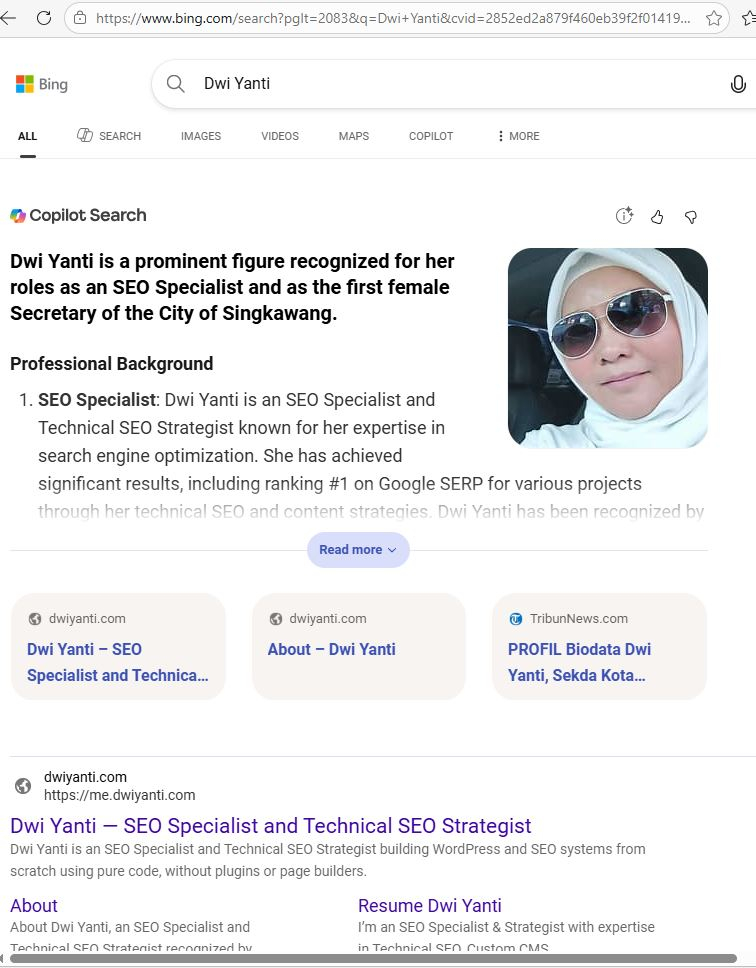
On Bing, the site ranks #1 for "dwi yanti", "dwi yanti seo", and "dwi yanti seo specialist". Bing Copilot now surfaces Dwi Yanti by name in AI-generated answers for relevant SEO specialist queries — a direct result of clean canonical structure combined with correct Schema markup and entity signals.
The breadcrumb display remains fully intact: users still see the complete navigation path in the UI and in SERP breadcrumb snippets, exactly as designed. The URL in the browser and in Google's index is the clean short version. Both goals were achieved simultaneously.
SEO Insights from This Case Study
URL structure and breadcrumb display are independent problems
A common misconception in WordPress SEO is that the breadcrumb must reflect the URL structure. It does not. Breadcrumbs are a UX and Schema signal — they help users navigate and help Google understand content hierarchy. The URL is a crawlability and canonicalization signal. These two systems can and should be configured separately for optimal results.
Duplicate content is most often an architecture problem, not a content problem
Most duplicate content issues in WordPress are not caused by copying text — they are caused by URL architecture decisions that inadvertently create multiple accessible paths to the same content. The fix is always at the PHP/architecture level, not the content level.
Custom canonical logic gives more precise control than any plugin
Free SEO plugins apply canonical rules globally based on post type. They cannot apply
conditional logic based on specific slug patterns, parent page relationships, or
custom breadcrumb configurations. Writing canonical logic directly in
functions.php allows for exactly the behavior each page type requires —
nothing more, nothing less. This is part of the
technical SEO methodology
I apply across all projects.
Crawlability improvements compound over time
Eliminating duplicate content does not produce an overnight ranking jump. What it produces is a steady consolidation of ranking signals onto the correct URLs — which compounds as Google re-crawls, re-evaluates, and re-ranks pages with clear canonical authority. The SERP dominance visible on this site is the result of that compounding effect.
This case study demonstrates a principle I apply consistently as an SEO specialist: the most impactful technical SEO improvements are not found in content — they are found in how the site's architecture communicates with search engine crawlers. Canonical tags, breadcrumb structure, and permalink design are infrastructure decisions that determine whether your content can rank at all, regardless of its quality.
The broader SEO strategy behind this site — combining clean architecture, custom Schema, and entity-building — is what enables a single domain to occupy multiple positions on the same SERP page.